- AI product photography is very good at scenes, backgrounds, variations and rescuing weak source photos.
- It is unreliable with exact shapes, label text, logos, embossing, glass, metal and fabric texture. Every image needs a human accuracy check.
- The best results come from real product photos plus AI, not from AI alone.
- Use it for catalog, ads and launch variations. Shoot with a camera when the product itself is the hero and must be exact.
We use AI in almost every product image we deliver. We also throw away a large share of what it produces. Both facts matter if you are deciding whether AI product photography is right for your brand, so this guide covers both: what the technology does well, where it fails, what a working process looks like and when you should still book a photographer.
What AI product photography actually is
AI product photography is the use of image models to create, extend or edit product images. In practice it covers four different jobs, and they are not equally mature:
- Cleanup and correction. Removing backgrounds, fixing light and colour, removing dust, straightening labels. Mature and dependable.
- Scene building. Placing a real product photo into a new environment: a kitchen counter, a stone ledge, a studio set with a coloured backdrop. Dependable when the product pixels come from a real photo.
- Variation. Producing the same product in different crops, ratios, seasons and moods for ads, marketplaces and social. This is where AI saves the most time.
- Full generation. Creating the product itself from a description or a rough reference. This is where most of the failures live.
When a tool promises "studio photos from one upload", it usually mixes all four. The trick is knowing which job you are asking for, because the risk is very different.
What it does well
Scenes you could not afford to build
A physical set with props, styling and lighting costs real money per setup. With a real product photo as the anchor, AI can build a dozen environments in the time a set takes to light. For a launch that needs a hero image, three lifestyle scenes and seasonal variants, that is the difference between one look and a whole visual world.
Consistency across a catalog
Brands that grow product by product end up with photos from different phones, rooms and years. AI is good at pulling those into one light, one background logic and one colour mood, so the shop looks like one brand instead of a collection of uploads.
Rescuing weak source material
Most of our projects start with phone photos. AI can lift exposure, clean noise, rebuild a cut-off edge and sharpen details that are present but soft. We wrote a separate guide on turning phone photos into product photos that covers what can and cannot be rebuilt.
Formats for every channel
A product page wants a clean square or 4:5 image. A Reels ad wants 9:16 with space for text. A marketplace may want a pure white main image. AI makes extending and reframing one approved image into all of those fast, without stretching or awkward crops.
Where it fails
This is the part most tool pages skip. These are the failure modes we check for on every single image:
- Shape drift. The bottle gets slightly taller, the box gains a bevel, the handle moves. Small enough to miss in a thumbnail, big enough to cause returns.
- Text and logos. Models rewrite letters. A label that says one thing in your photo can say something close but wrong in the output. Any visible text has to be checked against the real product, character by character.
- Embossing, engraving and fine relief. Pressed patterns, stamped metal and carved surfaces get smoothed or invented. On the Amulum project the whole point was that the Roman motifs pressed into each cookie had to be readable, so we treated every motif as a fixed detail that AI was not allowed to reinterpret.
- Materials. Glass, polished metal, transparent liquids and knitted or felted fabric are hard. Reflections look plausible but wrong, and fibre texture turns into a generic pattern.
- Colour accuracy. A brand red or a natural wool shade can shift. If colour is part of the purchase decision, it needs a reference and a check.
- Hands and people. Better than a year ago, still the first place a viewer notices something is off.
None of these are reasons to avoid AI. They are reasons to never publish an AI product image that nobody compared to the real product.
How a working process looks
The process we use is the same whether the brief is one product or a full launch. It is built so that AI does the heavy lifting and people make the decisions that need judgement.
- Send what exists. Phone photos, a product link, a packaging PDF, a voice note. We audit what is usable and list what is missing before anything is generated.
- Find the selling angle. What makes this product worth the price? What will the buyer doubt? The visual direction comes from those answers, not from a trend board.
- Build the system. Hero images, scenes, detail crops and variations come from one controlled direction, so they look like one shoot even when they come from many sources.
- Check accuracy. Shape, text, colour and fine detail are compared against the real product. Anything that drifted is fixed or discarded.
- Format for channels. Product pages, ads, marketplaces, email and social each get the ratios and file types they need, with notes on where each image should be used.
A real example: rough phone photos to a product set
Amulum is a Roman-motif cookie project from the Institute of Archaeology in Belgrade. The material we received was a few product photos, a blurry package shot and a loose idea. In a 48-hour sprint that became a set of product page images where the embossed motifs are finally readable.
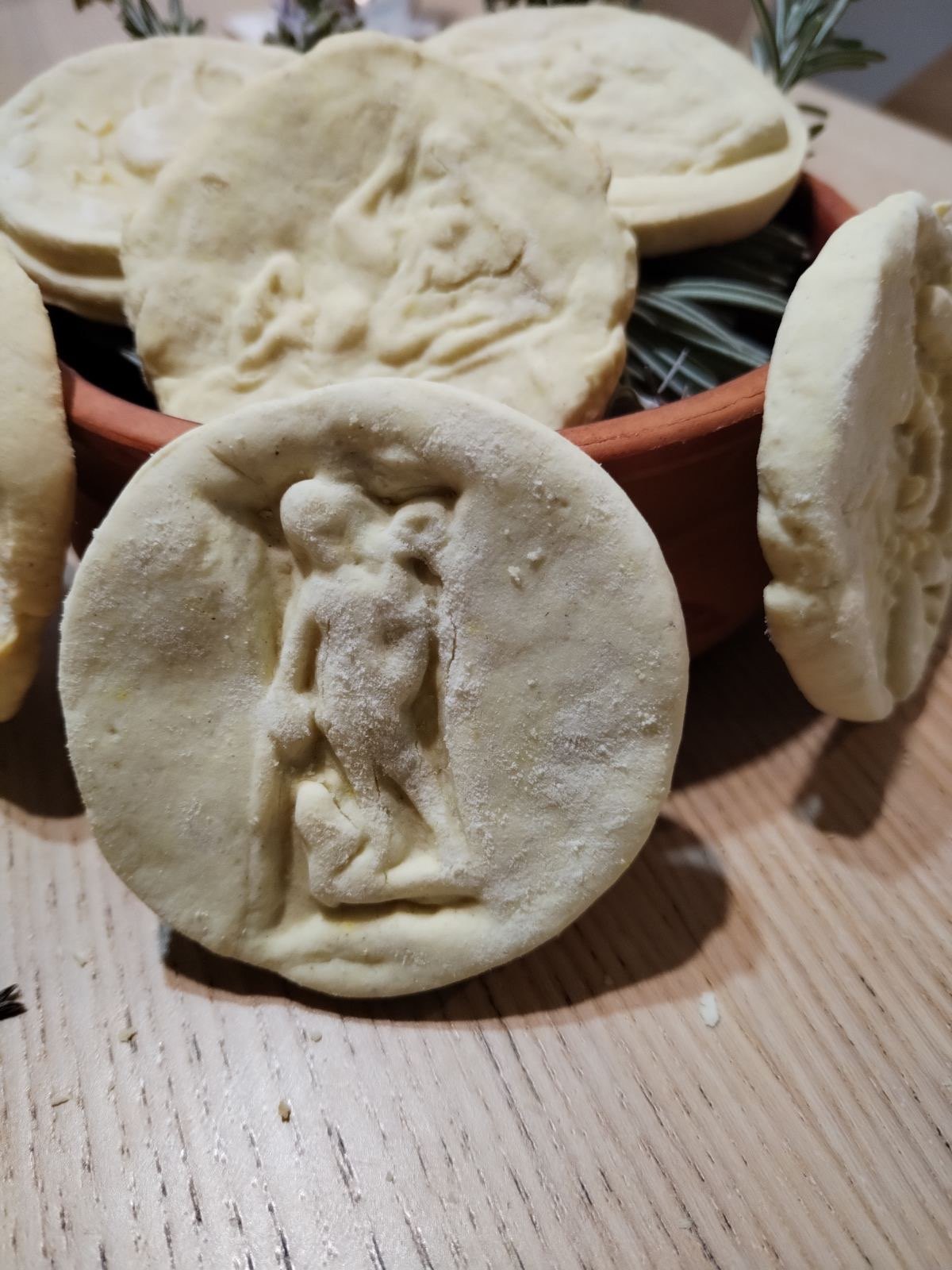
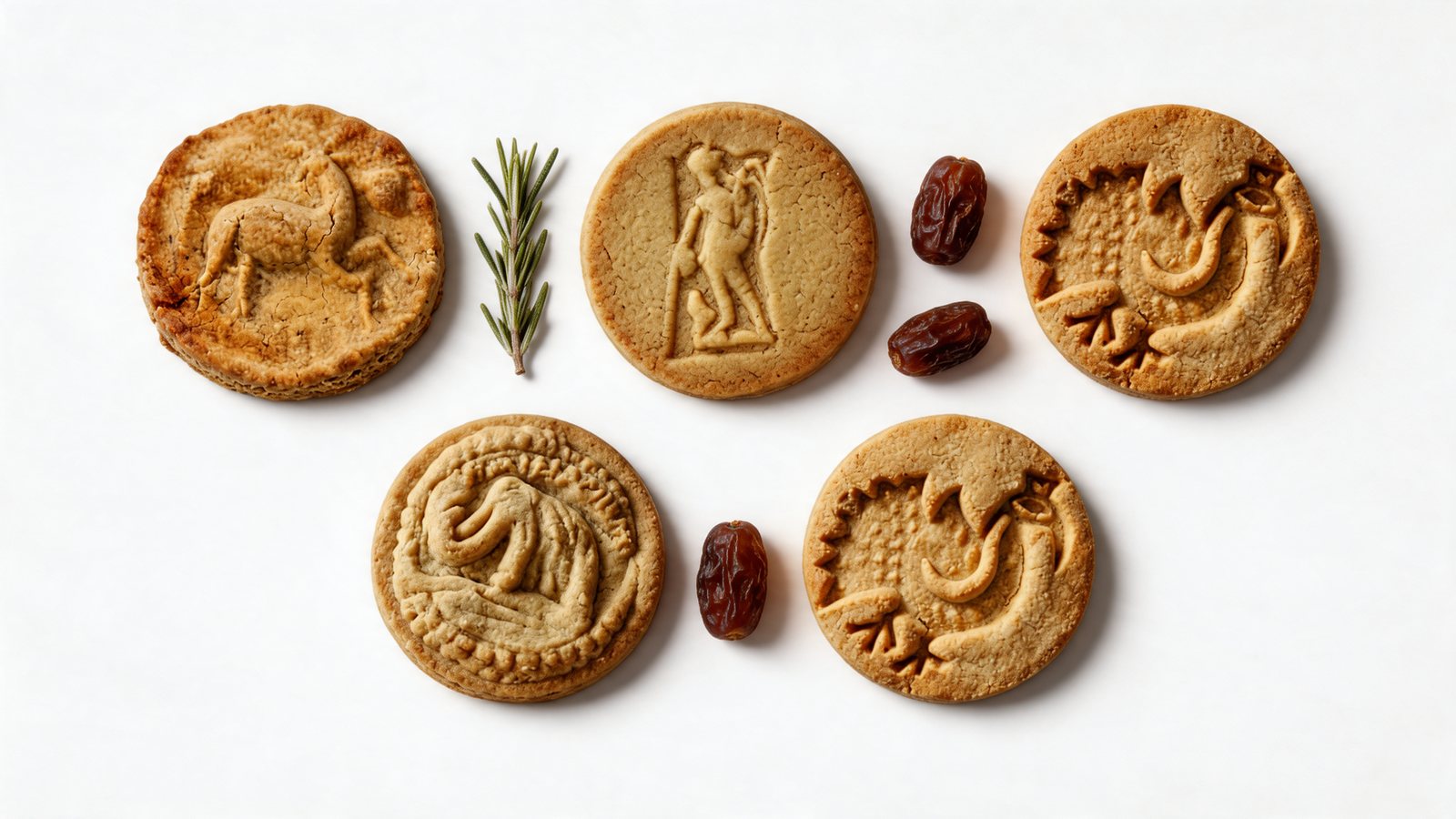
The AI work here was mostly invisible: cleaning, relighting and building a consistent backdrop. The decisions that mattered were human: which details were sacred, how warm the light should be, and what the set had to say about the product's origin.
What it costs
Per image, AI is far cheaper than a studio day. Per useful image, the gap is smaller, because someone still has to direct, select, check and fix. Our breakdown of AI vs traditional product photography compares the two honestly, and the guide to product launch creative package costs shows what a full set usually includes at different budgets.
A rough rule: if a tool's price per image looks too good, check what happens when the output is wrong. The cost of AI product photography is mostly in the checking.
From photos to video
Once a product has an approved set of images, the same visual world can be put in motion. Short ads, product loops and launch films can be built from those frames without a film shoot. We explain the method in how to make a product video ad without filming.
When you still need a camera
- The product is new, physical and complex (glass, jewellery, mechanical parts), and the image is the main reason someone buys.
- A marketplace or retailer requires the main image to be an unaltered photo of the actual product.
- You need many angles of a product that has never been photographed properly. AI cannot invent sides it has never seen.
- The images will be used in legal, medical or technical contexts where any deviation is a problem.
Even then, AI usually still helps afterwards: with scenes, formats and variations built from the real photos.
Common questions
Is AI product photography good enough for an online shop?
Yes, when the product pixels come from real photos and every image is checked for accuracy. Fully generated products are risky for shop pages because buyers compare the photo with what arrives.
Do I need to tell customers the images use AI?
Rules differ by country and platform, and they are changing. Scenes and backgrounds are usually treated differently from altering the product itself. If the product looks different from reality, that is a problem regardless of the tool used.
How many images do I need for a launch?
For one product, a typical starting set is a hero image, a clean main image, two or three scenes, a few detail crops and ad formats. The exact number depends on how many channels you sell in.
Can you work from product renders instead of photos?
Yes. 3D renders are a good anchor because shape and labels are already exact. AI then adds the scenes and mood that renders often lack.
Have rough material for a product?
Send the phone photos, the PDF or a voice note. Qualified briefs get a first scope direction within 4 hours.